
In this article
- 1. Understanding the November 2026 Microsoft 365 Outage
- What happened?
- Why did this matter to businesses?
- 2. Why Cloud-Based Businesses Are Vulnerable to Service Outages
- The hidden dependency problem
- Common cloud dependencies businesses should identify
- 3. The Difference Between Business Continuity, Disaster Recovery and High Availability
- Business continuity
- Disaster recovery
- High availability
- How they work together
- 4. How a Microsoft 365 Outage Can Affect Different Business Departments
- Sales and business development
- Customer support
- Finance and accounting
- Human resources
- Project management and engineering
- 5. What Should Businesses Do During a Cloud Service Outage?
- Step 1: Verify the incident
- Step 2: Identify critical business functions
- Step 3: Activate alternative communication
- Step 4: Protect pending work
- Step 5: Avoid unnecessary technical changes
- 6. How Developers Can Build Applications That Survive Third-Party Service Failures
- 6.1 Implement timeout management
- 6.2 Use retry mechanisms with exponential backoff
- 6.3 Implement circuit breakers
- 6.4 Use message queues for asynchronous operations
- 6.5 Design idempotent operations
- 6.6 Monitor dependencies independently
- 7. Building a Business Continuity Architecture for Modern Applications
- Recommended architecture components
- Example: Customer enquiry application
- 8. Understanding RTO and RPO: Two Important Disaster Recovery Metrics
- What is Recovery Time Objective (RTO)?
- What is Recovery Point Objective (RPO)?
- RTO vs RPO comparison
- Example recovery targets by business system
- 9. Why Backups Alone Are Not Enough
- A complete backup and recovery strategy should include:
- 10. Is Multi-Cloud or Multi-Provider Architecture the Answer?
- What is multi-cloud architecture?
- Benefits
- Challenges
- What should businesses choose?
- 11. The Role of AI and Automation in Business Continuity
- AI-powered infrastructure monitoring
- Automated incident notifications
- Intelligent workflow recovery
- AI application dependency management
- 12. A Practical Business Continuity Checklist for Organizations
- Infrastructure and technology
- Communication and operations
- Security and access
- Testing and recovery
- 13. What Should Businesses Do After a Cloud Service Is Restored?
- Step 1: Verify service availability
- Step 2: Review pending operations
- Step 3: Process queues carefully
- Step 4: Check for duplicate records
- Step 5: Inform customers and employees
- Step 6: Conduct a post-incident review
- 14. How to Build a Long-Term Cloud Resilience Strategy
- Phase 1: Assess current infrastructure
- Phase 2: Identify business risks
- Phase 3: Improve application architecture
- Phase 4: Implement recovery procedures
- Phase 5: Conduct regular testing
- Phase 6: Continuously improve
- 15. Frequently Asked Questions (FAQs)
- 1. What is business continuity in cloud computing?
- 2. Why can a Microsoft 365 outage affect other business applications?
- 3. Can businesses continue working during a Microsoft 365 outage?
- 4. What is the difference between cloud backup and disaster recovery?
- 5. How can developers prevent API failures from affecting entire applications?
- 6. Is multi-cloud architecture necessary for business continuity?
- 7. How often should organizations test disaster recovery plans?
- 8. What are RTO and RPO in disaster recovery?
- 9. Can AI help prevent cloud outages?
- 10. What should a company do immediately after a cloud outage?
- 16. How CrowdApps Technologies Helps Businesses Build Resilient Digital Solutions
- Our technology capabilities
- Building software that keeps your business moving
Modern businesses depend heavily on cloud-based platforms to manage communication, collaboration, documents, customer relationships, internal operations, and daily business activities.
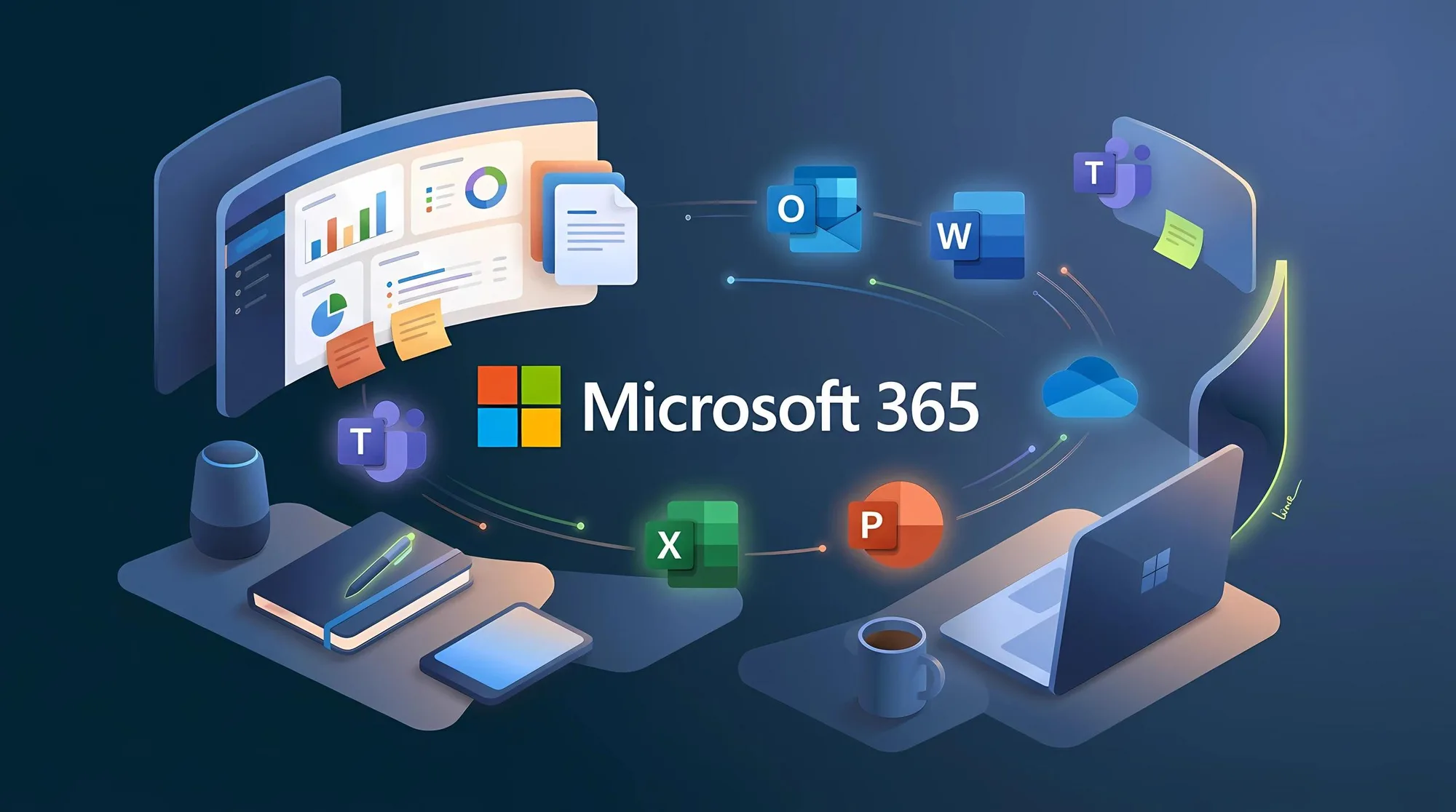
Microsoft 365 has become one of the most widely used productivity ecosystems, supporting organizations through services such as Outlook, Exchange Online, Microsoft Teams, SharePoint, OneDrive, and Microsoft Copilot.
For many companies, these services are not simply productivity tools. They are essential components of everyday business operations.
However, the Microsoft 365 disruption reported on November 12–13, 2026, demonstrated an important reality: even highly established cloud platforms can experience unexpected service interruptions.
The disruption affected access to Exchange Online and other Microsoft 365 services, leaving some users unable to access mailboxes and dependent collaboration workflows. Microsoft's incident advisories tracked the disruption under EX1550543 and MO1550821. Recovery was progressing across regions, although service availability and recovery experiences varied.
For businesses, this incident raises a much bigger question:
What happens when the technology your entire organization depends on suddenly becomes unavailable?
Can employees continue working? Can customers still contact your organization? Will business applications continue processing requests? Can critical information be accessed? And how quickly can normal operations resume?
These questions are at the heart of business continuity and disaster recovery planning.
In this guide, we explore the business and technical implications of cloud service outages, the risks of depending on a single technology ecosystem, and the practical strategies organizations can implement to build more resilient digital operations.
1. Understanding the November 2026 Microsoft 365 Outage
The November 2026 incident highlighted how a disruption within shared cloud infrastructure can affect multiple services and user workflows.
Microsoft tracked two important incidents:
- EX1550543: Users experienced difficulties connecting to Exchange Online mailboxes through different connection methods.
- MO1550821: Users experienced connectivity problems across multiple Microsoft 365 services.
Reportedly affected functions included Outlook and Exchange Online access, selected Teams functionality, SharePoint-related features, and Microsoft Graph requests involving Exchange data. The impact was not identical across every service or user.
What happened?
Microsoft's incident communications described infrastructure capacity and server stability problems. Some servers returned to service but became unresponsive again when they received traffic.
Microsoft worked on traffic management, infrastructure recovery, server validation, and configuration-related investigation.
It is important to distinguish between the reported technical observations and the final root cause. At the time of the incident updates referenced in this article, a complete root-cause explanation had not yet been established.
Why did this matter to businesses?
Consider an organization that manages most of its operations through Microsoft 365.
When employees cannot access their mailboxes, several other activities may be affected:
- Sales teams may be unable to respond to customer enquiries.
- Project managers may lose access to important communication threads.
- Employees may struggle to coordinate meetings and schedules.
- Approval processes may remain pending.
- Support teams may experience delays in responding to customers.
- Applications relying on Microsoft integrations may encounter failures.
The important lesson is that an outage does not have to affect every service to disrupt an entire business process.
A company might still have access to its website, database, and internal applications while being unable to complete important operational activities.
2. Why Cloud-Based Businesses Are Vulnerable to Service Outages
Cloud computing has transformed how organizations develop and operate software.
Businesses no longer need to maintain every application, database, communication platform, or infrastructure component themselves.
Instead, they can use managed services from providers such as Microsoft, Amazon Web Services, and Google Cloud.
However, convenience introduces dependencies.
The hidden dependency problem
A business application may appear to operate independently, but internally it can depend on multiple external services.
For example, consider a customer management application:
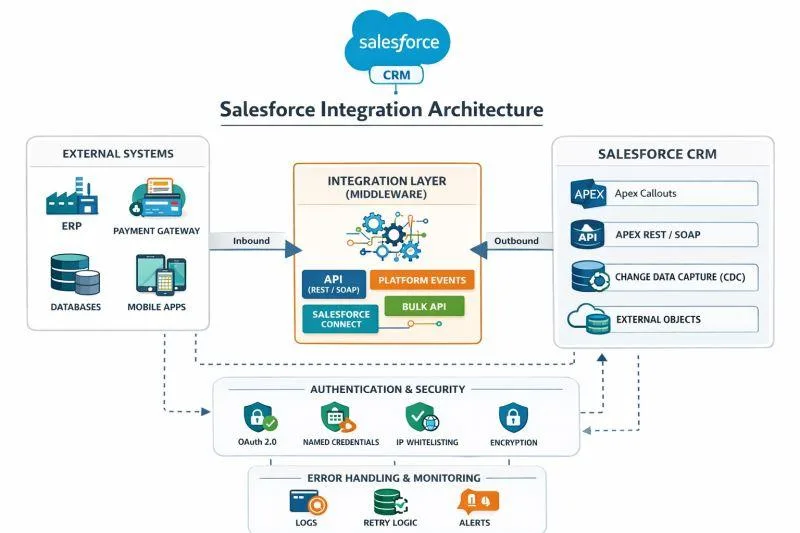
A single customer interaction might involve:
- A customer submits an enquiry through a website.
- The application stores the information in a database.
- An email notification service sends an acknowledgement.
- An employee receives an alert.
- A manager approves the request.
- A reporting system updates business records.
If the notification provider becomes unavailable, the enquiry may still be stored successfully, but the employee may never receive the notification.
This creates a dependency failure.
The application itself is operational, but the business workflow is incomplete.
Common cloud dependencies businesses should identify
| Dependency | Potential business impact |
|---|---|
| Email services | Delayed customer communication |
| Identity providers | Users unable to authenticate |
| Cloud databases | Application data unavailable |
| File storage | Documents inaccessible |
| Third-party APIs | Integration failures |
| Payment gateways | Transactions interrupted |
| Notification services | Missed alerts |
| AI services | Automated workflows interrupted |
| DNS providers | Websites and APIs become unreachable |
Organizations should understand these dependencies before an outage occurs, rather than discovering them during an emergency.
3. The Difference Between Business Continuity, Disaster Recovery and High Availability
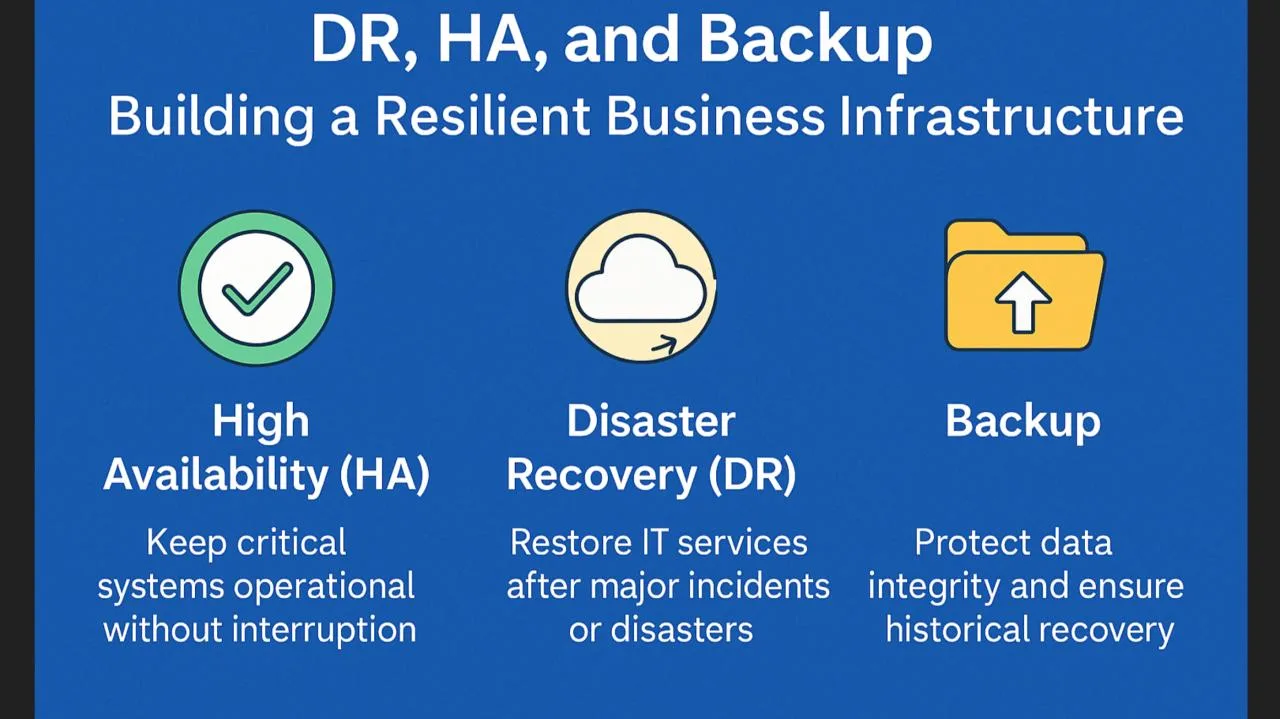
These three concepts are often used interchangeably, but they solve different problems.
Business continuity
Business continuity focuses on keeping essential business activities operational during disruptions.
It answers:
- How will employees communicate?
- How will customers submit requests?
- Which activities can continue manually?
- How will urgent approvals be handled?
- Which operations can temporarily stop?
For example, if an organization's primary email platform becomes unavailable, employees may use an approved alternative communication channel while keeping a record of pending customer interactions.
Disaster recovery
Disaster recovery focuses on restoring technology systems and data after a major disruption.
It includes:
- Restoring databases.
- Recovering applications.
- Rebuilding infrastructure.
- Restoring backups.
- Reconnecting integrations.
- Validating recovered systems.
High availability
High availability focuses on minimizing downtime by designing systems that can continue operating when individual components fail.
Examples include:
- Multiple application instances.
- Load balancing.
- Database replication.
- Redundant infrastructure.
- Health checks and automatic failover.
How they work together
| Strategy | Primary objective |
|---|---|
| High availability | Minimize service interruptions |
| Disaster recovery | Restore systems after disruption |
| Business continuity | Keep essential business operations running |
A backup alone does not guarantee business continuity. Similarly, multiple application servers do not automatically protect an organization from a third-party identity or email provider outage.
A mature technology strategy needs all three.
4. How a Microsoft 365 Outage Can Affect Different Business Departments

Cloud outages create different challenges depending on how an organization operates.
Sales and business development
Sales teams frequently depend on email, calendars, CRM integrations, and customer communication tools.
Potential problems include:
- Delayed responses to incoming enquiries.
- Missed meeting invitations.
- Incomplete follow-ups.
- Delays in sending quotations.
- Difficulty accessing previous conversations.
Recommended approach: Maintain an independent customer relationship management system, preserve customer records outside a single communication channel, and establish approved alternative communication procedures.
Customer support
Customer support operations can be particularly vulnerable because customers expect timely responses.
If ticket notifications or email acknowledgements fail, requests may remain unnoticed.
Recommended approach: Maintain durable ticket records, monitor pending requests independently, and provide alternative support channels.
Finance and accounting
Finance teams may rely on cloud-based approval workflows, document sharing, and automated notifications.
An outage could delay:
- Invoice approvals.
- Payment authorization.
- Purchase requests.
- Financial reporting.
- Vendor communication.
Recommended approach: Maintain controlled approval procedures, transaction records, and alternative authorization processes with appropriate audit trails.
Human resources
HR teams use digital platforms for recruitment, employee communication, leave management, and onboarding.
Service interruptions can affect interview scheduling, candidate communication, employee approvals, and document access.
Recommended approach: Maintain accessible contact information, important employee records, and independent operational procedures.
Project management and engineering
Software development and project delivery teams depend on collaboration tools, source control, task management systems, cloud environments, and communication platforms.
An outage can affect:
- Sprint planning.
- Client meetings.
- Incident coordination.
- Deployment approvals.
- Technical documentation access.
Recommended approach: Ensure critical project documentation, source repositories, runbooks, and incident procedures are accessible through independent and appropriately secured systems.
5. What Should Businesses Do During a Cloud Service Outage?
The first priority should be to understand the scope of the incident and prevent unnecessary operational disruption.

Step 1: Verify the incident
Do not immediately assume that every application problem is caused by a global cloud outage.
Check:
- Official provider status pages.
- Tenant-specific service health.
- Application monitoring.
- Network connectivity.
- Authentication failures.
- Error logs.
For Microsoft 365, administrators can use the Microsoft Service Health dashboard or the public service status page.
Step 2: Identify critical business functions
Create a list of processes that are currently affected.
For example:
| Business function | Priority | Alternative action |
|---|---|---|
| Customer enquiries | Critical | Use approved alternate channel |
| Internal communication | High | Activate backup communication |
| Financial approvals | Critical | Follow controlled manual approval |
| Routine reporting | Medium | Temporarily defer |
| Internal documentation | Medium | Use approved offline copies |
Step 3: Activate alternative communication
Organizations should establish approved backup communication channels before an incident.
These may include:
- Secondary business email services.
- Approved collaboration applications.
- Emergency contact directories.
- Internal incident communication channels.
- Business telephone systems.
Avoid transferring confidential customer or business information into unauthorized personal accounts.
Step 4: Protect pending work
Employees should record:
- Messages awaiting responses.
- Unconfirmed transactions.
- Pending approvals.
- Customer requests.
- Missed appointments.
- Unprocessed system notifications.
This prevents important work from disappearing into an uncertain state.
Step 5: Avoid unnecessary technical changes
During a provider-side incident, repeatedly changing DNS records, authentication configurations, email routing, or application settings can create additional problems.
Changes should only be made through an approved incident response procedure with clear ownership and rollback instructions.
6. How Developers Can Build Applications That Survive Third-Party Service Failures
This is one of the most important lessons for software development teams.
Modern applications frequently integrate with external services through REST APIs, webhooks, SDKs, authentication providers, and cloud-based infrastructure.
A resilient application should not assume that every external dependency will always be available.

Here are important engineering practices.
6.1 Implement timeout management
Every external API request should have an appropriate timeout.
Without timeouts, an application may hold connections open while waiting for an unavailable service.
This can consume server resources and affect unrelated requests.
For example, an application sending an email notification should not leave the customer's entire submission process waiting indefinitely for the email provider.
Instead:
- Accept and validate the request.
- Save the business transaction.
- Record the notification as pending.
- Process notification delivery independently.
- Update its status after success or failure.
6.2 Use retry mechanisms with exponential backoff
Temporary service failures may recover automatically.
However, immediately repeating failed requests can increase pressure on an already struggling service.
Exponential backoff progressively increases the waiting period between attempts.
For example:
| Attempt | Suggested waiting period |
|---|---|
| First retry | 2 seconds |
| Second retry | 4 seconds |
| Third retry | 8 seconds |
| Fourth retry | 16 seconds |
| Fifth retry | 32 seconds |
These are illustrative values, not universal defaults. Actual policies should account for the provider's guidance, request type, deadlines, and retry limits.
Microsoft Graph specifically recommends respecting the Retry-After response header and using exponential backoff when that header is unavailable.
Microsoft Learn
6.3 Implement circuit breakers
A circuit breaker prevents applications from repeatedly calling an external service that is consistently failing.
It generally has three states:
- Closed: Requests are allowed normally.
- Open: Requests are temporarily blocked because the dependency is failing.
- Half-open: A limited number of test requests are allowed to check whether recovery has occurred.
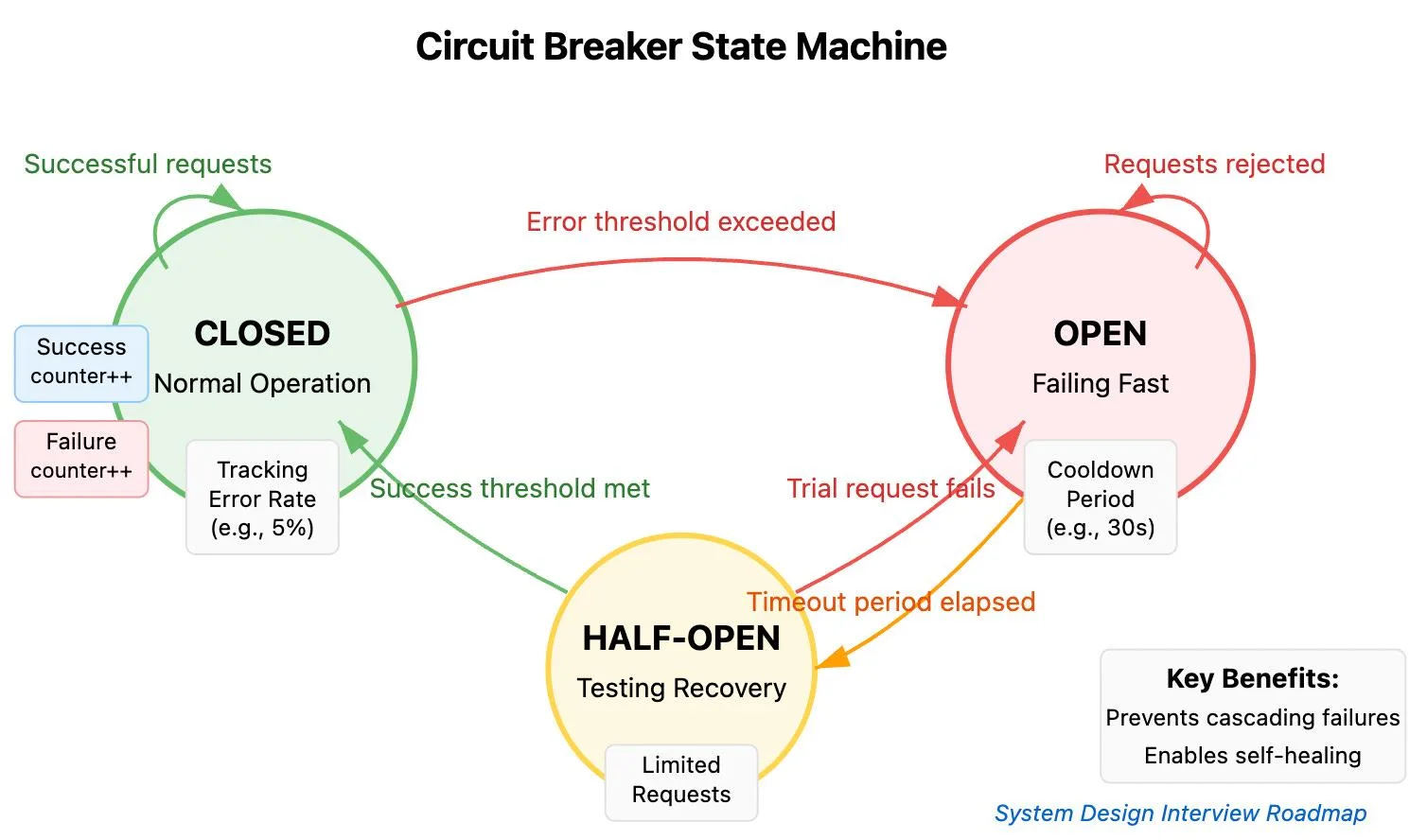
This helps prevent a failing third-party service from exhausting the resources of your own application.
6.4 Use message queues for asynchronous operations
Not every operation needs to be completed immediately.
Consider a website receiving 500 customer enquiries during a period when its email service is unavailable.
A poorly designed application might fail to submit enquiries because email delivery is unsuccessful.
A better architecture separates enquiry processing from notification delivery.
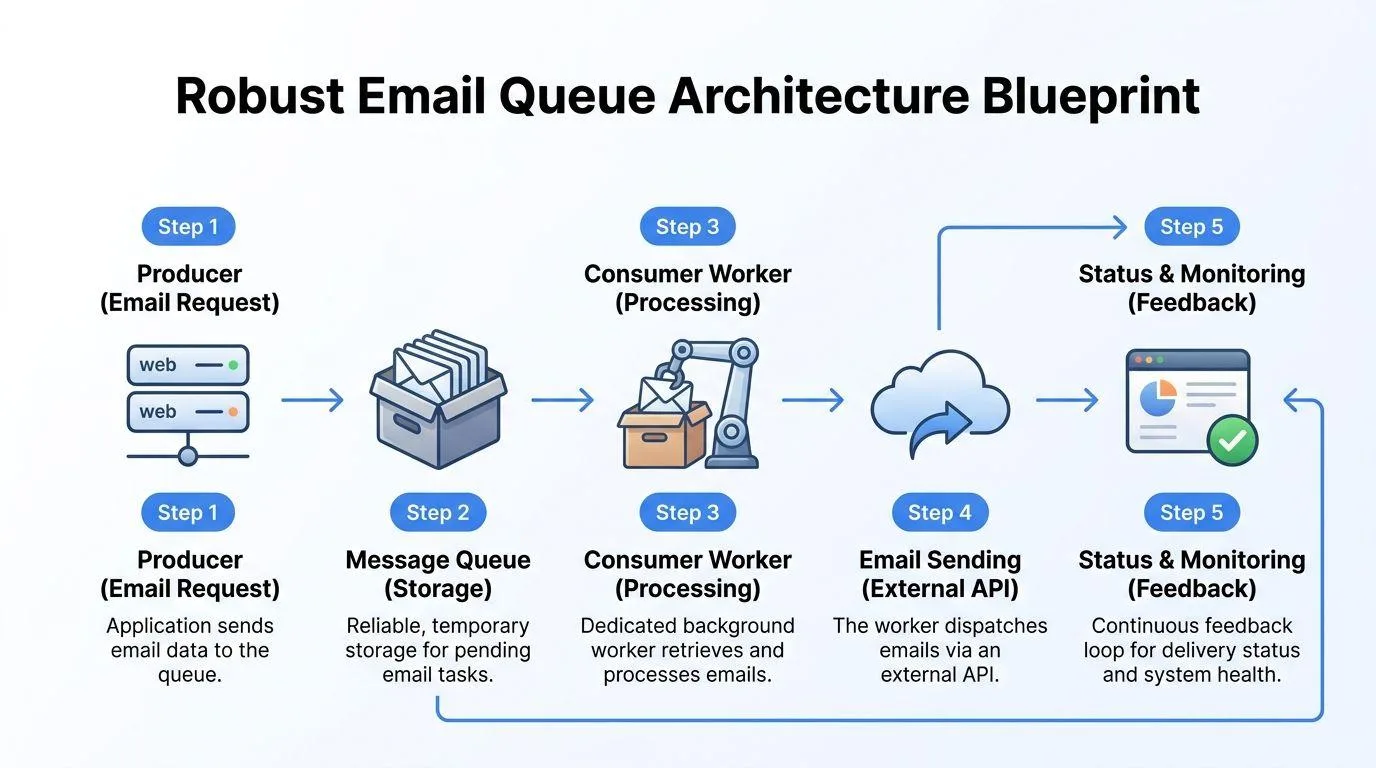
Recommended workflow:
- Customer submits an enquiry.
- Backend validates the request.
- Enquiry is saved in the primary database.
- A notification job is placed into a durable queue.
- A background worker processes the notification.
- If delivery fails, the job is retried according to policy.
- Permanently failing jobs are moved to a dead-letter queue for investigation.
This ensures that a temporary email service outage does not automatically result in lost customer enquiries.
6.5 Design idempotent operations
A particularly dangerous situation occurs when an application sends a request but never receives a response.
Did the operation fail, or did it succeed while the response was lost?
If the application retries without safeguards, the same transaction may happen twice.
Examples include:
- Duplicate payments.
- Multiple customer records.
- Repeated email notifications.
- Duplicate bookings.
- Multiple approval actions.
Idempotency keys, unique transaction identifiers, and database constraints help prevent duplicate operations.
6.6 Monitor dependencies independently
Monitoring only your own application server is insufficient.
A website can return HTTP 200 while important features are failing.
Monitor:
- API response times.
- External service availability.
- Authentication success rates.
- Email delivery status.
- Queue backlog.
- Database connectivity.
- Failed webhook processing.
- End-to-end business transactions.
The objective is to monitor whether the business process is working, not merely whether the application is running.
7. Building a Business Continuity Architecture for Modern Applications
Businesses should design their applications around failure scenarios rather than assuming perfect service availability.
A practical architecture can include the following components:
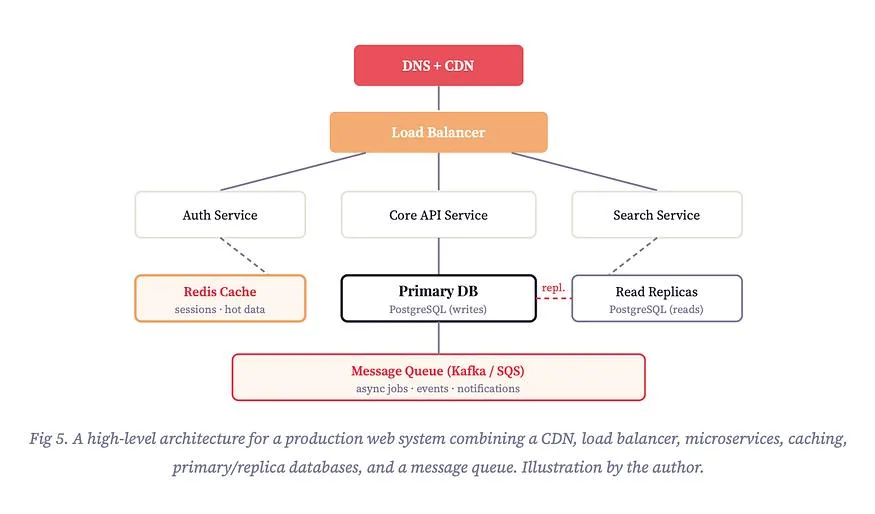
Recommended architecture components
| Component | Purpose |
|---|---|
| Load balancer | Distributes application traffic |
| Multiple application instances | Reduces single-server dependency |
| Managed database backups | Supports data recovery |
| Database replication | Improves availability and recovery options |
| Message queues | Preserve pending asynchronous operations |
| Circuit breakers | Prevent cascading failures |
| API gateways | Centralize API access and controls |
| Independent monitoring | Detect external dependency failures |
| Centralized logging | Support incident investigation |
| Disaster recovery environment | Restore critical applications |
Example: Customer enquiry application
Imagine an organization running a custom-built enquiry management system.
Its architecture includes:
- Next.js frontend.
- Node.js backend.
- MongoDB or PostgreSQL database.
- External email provider.
- CRM integration.
- Background notification workers.
If the email provider experiences an outage, the application should continue accepting customer enquiries, storing them safely, and displaying their status.
Once the email service recovers, pending notifications can be processed.
The same principle applies to CRM synchronization, document generation, reporting, and other external integrations.
The design principle is simple: a temporary failure in one dependency should not automatically stop the entire business application.
8. Understanding RTO and RPO: Two Important Disaster Recovery Metrics
Business continuity planning requires measurable recovery objectives.
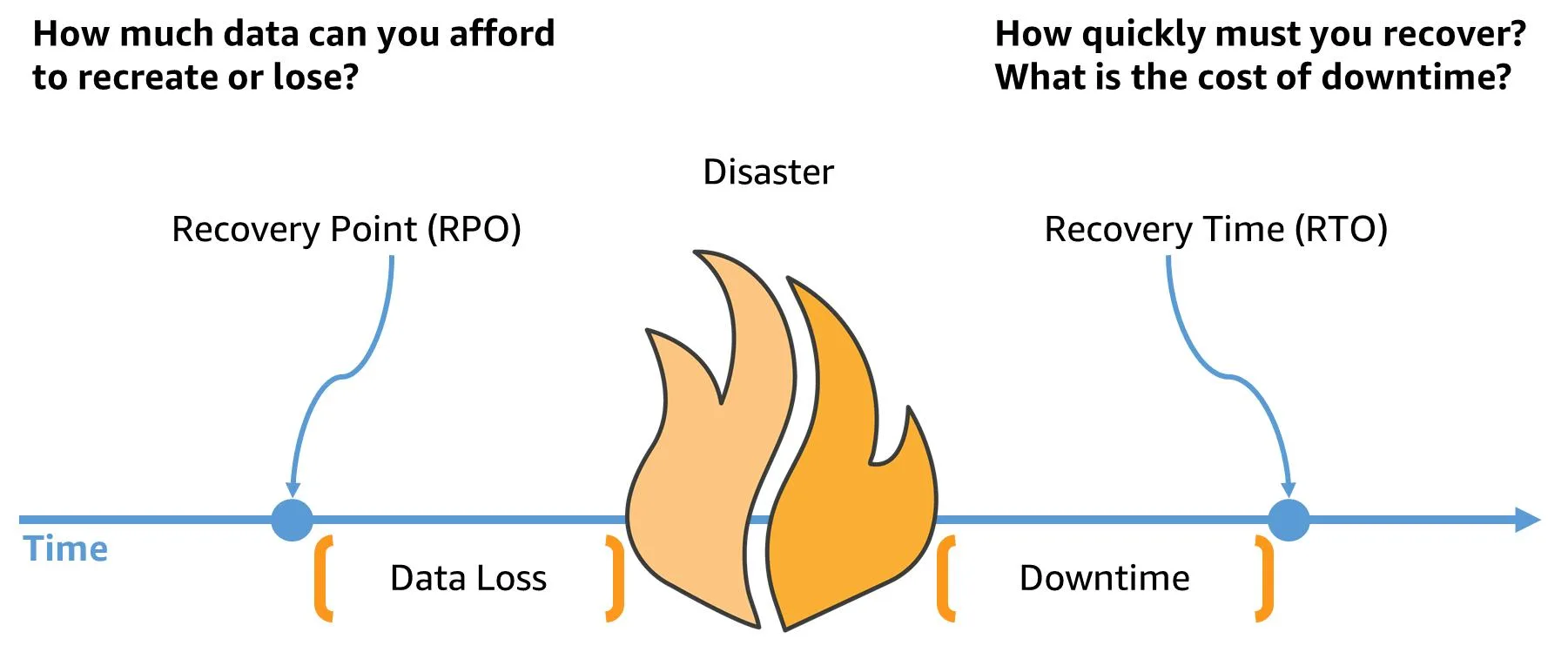
Two of the most important metrics are Recovery Time Objective (RTO) and Recovery Point Objective (RPO).
What is Recovery Time Objective (RTO)?
RTO defines the maximum acceptable time an organization can tolerate a particular system or business process being unavailable.
For example:
If an organization's customer support system has an RTO of two hours, the recovery strategy should aim to restore the critical service within that timeframe.
What is Recovery Point Objective (RPO)?
RPO defines how much recent data an organization can afford to lose, measured in time.
For example:
If the RPO is 15 minutes, the organization should have a recovery strategy that limits potential data loss to approximately 15 minutes of recent activity.
RTO vs RPO comparison
| Metric | Meaning | Example |
|---|---|---|
| RTO | Maximum acceptable downtime | 2 hours |
| RPO | Maximum acceptable data loss window | 15 minutes |
Example recovery targets by business system
The following are illustrative planning targets, not universal standards.
| Business system | Example RTO | Example RPO |
|---|---|---|
| Customer-facing application | 1 hour | 15 minutes |
| Payment processing | 30 minutes | 5 minutes |
| Internal reporting | 8 hours | 4 hours |
| Document management | 4 hours | 1 hour |
| Internal collaboration | 2 hours | 30 minutes |
Every organization should determine its own targets through a business impact analysis.
A payment processing system may require much faster recovery than an internal reporting application.
The objective is to prioritize technology investment according to actual business risk.
9. Why Backups Alone Are Not Enough
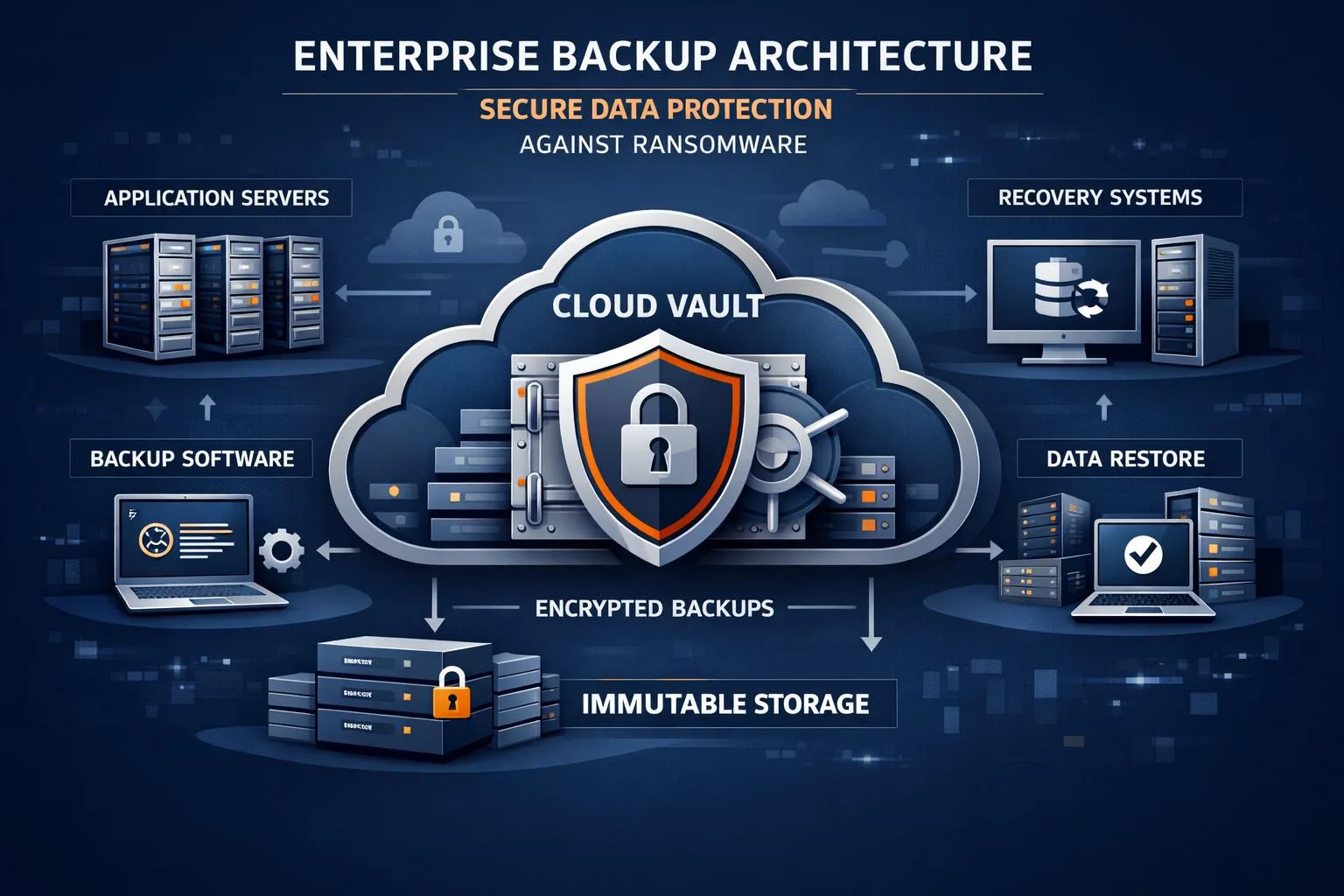
Many organizations believe that maintaining regular backups is sufficient to protect their business from technology failures.
Backups are essential, but they solve only part of the problem.
Imagine that a company has successfully backed up its customer database.
An unexpected outage then makes its primary communication platform unavailable.
The database backup may be perfectly safe, but employees still cannot communicate with customers or complete certain workflows.
This is why organizations need to think beyond data protection.
A complete backup and recovery strategy should include:
1. Database backups
Maintain regular database backups with appropriate retention policies.
2. Application backups
Protect application code, deployment configurations, environment documentation, and infrastructure definitions.
3. Configuration backups
Securely preserve essential DNS, networking, authentication, and integration configuration information.
4. Offsite or independent backup storage
Avoid keeping all recovery copies within the same failure domain as the production environment.
5. Backup restoration testing
Regularly restore sample backups to verify that the data is usable.
6. Access protection
Protect backup credentials and storage using appropriate access controls, encryption, and monitoring.
7. Recovery documentation
Document who can initiate recovery, which resources must be restored first, and how successful restoration will be verified.
The important distinction is that a successful backup does not prove that an organization can successfully recover.
Only tested restoration procedures provide meaningful confidence.
10. Is Multi-Cloud or Multi-Provider Architecture the Answer?
One common reaction to a major cloud outage is to move everything to another provider or maintain multiple cloud environments.
However, multi-cloud architecture is not automatically the best solution for every organization.
What is multi-cloud architecture?
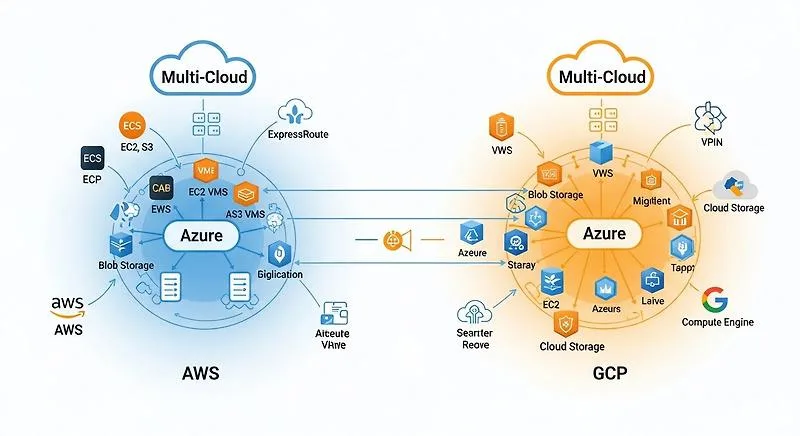
Multi-cloud means using services from more than one cloud provider.
For example:
- AWS for application hosting.
- Microsoft Azure for selected enterprise services.
- Google Cloud for analytics or AI workloads.
The objective may be to reduce dependence on one provider or use the strengths of different platforms.
Benefits
- Reduced dependence on one infrastructure provider.
- Additional deployment and recovery options.
- Greater flexibility in selecting technology.
- Potentially improved resilience for selected workloads.
- Better control over certain infrastructure dependencies.
Challenges
- Higher infrastructure costs.
- More complex architecture.
- Additional security and identity management.
- Data synchronization challenges.
- More complicated monitoring.
- Increased operational and maintenance requirements.
What should businesses choose?
The right approach depends on business requirements.
| Business requirement | Potential approach |
|---|---|
| Small business | Tested alternative communication channels |
| Growing SaaS company | Multi-zone infrastructure and reliable backups |
| Enterprise application | Defined disaster recovery environment |
| Financial platform | Strong transaction consistency and tested failover |
| Global application | Multi-region deployment where justified |
| Highly regulated organization | Independent recovery and compliance controls |
For many businesses, the first priority should be identifying single points of failure and testing practical alternatives.
A well-designed single-cloud application with strong recovery procedures can be more resilient than a poorly managed multi-cloud environment.
11. The Role of AI and Automation in Business Continuity
Artificial intelligence and automation are becoming important parts of modern business operations.
They can also improve how organizations identify, respond to, and recover from technology disruptions.

AI-powered infrastructure monitoring
AI-assisted monitoring can analyze infrastructure metrics, application logs, and historical patterns to identify unusual behavior.
Potential applications include:
- Detecting unusual API response times.
- Identifying increasing error rates.
- Predicting resource exhaustion.
- Identifying abnormal traffic patterns.
- Highlighting recurring integration failures.
Automated incident notifications
When a critical dependency becomes unavailable, automated systems can:
- Detect the failure.
- Create an incident record.
- Notify the responsible team.
- Assign the appropriate priority.
- Track the incident.
- Escalate unresolved issues.
These workflows reduce dependence on manual monitoring.
Intelligent workflow recovery
Automation can also help process pending business operations after a service returns.
For example, a business application could automatically identify failed notification jobs, retry eligible requests, and escalate unresolved records for manual review.
However, automated recovery must be carefully controlled.
AI should not independently approve financial transactions, replay potentially duplicate payments, or make sensitive operational decisions without appropriate authorization.
AI application dependency management
Organizations developing AI-powered applications should also consider the availability of external models, vector databases, APIs, and connected business data sources.
An AI assistant may remain accessible even when its underlying information source is unavailable.
The application should communicate when information cannot be retrieved rather than presenting incomplete information as accurate and current.
12. A Practical Business Continuity Checklist for Organizations
A business continuity strategy is useful only when employees and technical teams can actually execute it.
The following checklist provides a starting point for organizations preparing for unexpected cloud outages.
Infrastructure and technology
- Identify all critical cloud service dependencies.
- Document application architecture and external integrations.
- Maintain tested database backups.
- Establish recovery environments for critical applications.
- Configure infrastructure and application monitoring.
- Implement appropriate API timeout and retry policies.
- Use durable queues for critical asynchronous operations.
- Protect emergency administrative access.
Communication and operations
- Maintain an approved alternative communication channel.
- Keep emergency contact information accessible.
- Identify critical business processes.
- Document manual operating procedures.
- Define escalation responsibilities.
- Establish customer communication procedures.
- Maintain a record of pending transactions and approvals.
Security and access
- Review access control policies.
- Secure emergency credentials.
- Maintain independent recovery documentation.
- Verify access to backup systems.
- Test alternative authentication procedures.
- Review third-party provider security dependencies.
Testing and recovery
- Define RTO and RPO for critical systems.
- Test database restoration.
- Conduct outage simulation exercises.
- Validate integration recovery.
- Verify duplicate transaction prevention.
- Test backlog processing.
- Document lessons learned after every exercise.
13. What Should Businesses Do After a Cloud Service Is Restored?
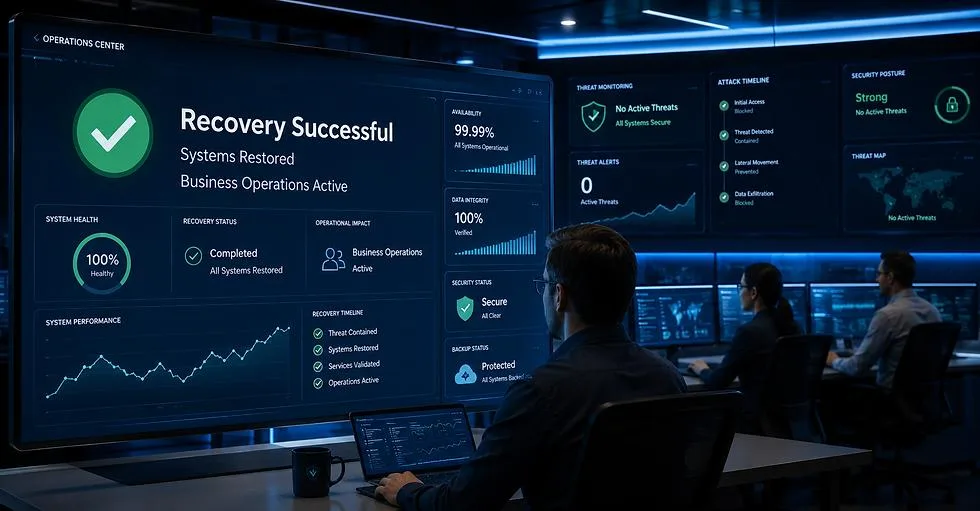
Service restoration does not necessarily mean that every business operation has returned to normal.
A cloud provider may report that its infrastructure is recovering, while individual organizations still have pending messages, failed integrations, and incomplete transactions.
Businesses should therefore follow a controlled recovery process.
Step 1: Verify service availability
Test the actual functions employees need rather than relying exclusively on a provider's status dashboard.
For Microsoft 365, verify:
- Sending and receiving email.
- Mailbox access.
- Calendar synchronization.
- Teams communication.
- SharePoint document access.
- Relevant Microsoft Graph integrations.
Step 2: Review pending operations
Identify transactions that were delayed or interrupted.
Examples include:
- Pending customer notifications.
- Failed API requests.
- Unprocessed webhook events.
- Delayed approvals.
- Incomplete synchronization jobs.
Step 3: Process queues carefully
Restart background workers and process pending jobs at a controlled rate.
Avoid sending every queued request simultaneously.
This can prevent additional service pressure and help identify problematic transactions.
Step 4: Check for duplicate records
Verify that interrupted operations have not created duplicate payments, customer records, bookings, or notifications.
Step 5: Inform customers and employees
Communicate service restoration and clarify whether any requests require resubmission or additional action.
Step 6: Conduct a post-incident review
Document:
- What failed?
- Which business functions were affected?
- How long were they disrupted?
- Which recovery procedures worked?
- Which dependencies were overlooked?
- What improvements should be implemented?
Assign an owner and deadline to each corrective action.
A post-incident review should focus on improving systems and procedures rather than simply identifying who made a mistake.
14. How to Build a Long-Term Cloud Resilience Strategy
Preparing for outages should not be treated as a one-time IT project.
Technology dependencies evolve continuously as businesses adopt new software, APIs, cloud platforms, AI solutions, and automation tools.
A long-term strategy should include the following stages.

Phase 1: Assess current infrastructure
Start by understanding how existing systems operate.
Identify:
- Critical applications.
- External service dependencies.
- Database and storage architecture.
- Authentication systems.
- Communication platforms.
- Integration failure points.
Phase 2: Identify business risks
Prioritize services according to their business importance.
A business should understand which failures would create financial losses, customer dissatisfaction, compliance issues, or operational delays.
Phase 3: Improve application architecture
Implement appropriate engineering controls:
- Fault isolation.
- API timeouts.
- Exponential backoff.
- Circuit breakers.
- Durable message queues.
- Idempotent processing.
- Independent monitoring.
Phase 4: Implement recovery procedures
Establish backup, restoration, infrastructure recovery, and business communication procedures.
Ensure that responsibilities are clearly assigned.
Phase 5: Conduct regular testing
Run practical exercises rather than relying entirely on documentation.
Simulate scenarios such as:
- Email service unavailable for four hours.
- Primary database temporarily inaccessible.
- Third-party API returning repeated errors.
- Authentication provider unavailable.
- Application region experiencing infrastructure failure.
Phase 6: Continuously improve
Review architecture, infrastructure, security, and recovery procedures as the organization grows.
The goal is to make resilience part of normal software development and operational management.
15. Frequently Asked Questions (FAQs)
1. What is business continuity in cloud computing?
Business continuity in cloud computing means ensuring that critical business operations can continue during unexpected disruptions involving cloud services, applications, infrastructure, or external providers.
It involves alternative communication channels, recovery procedures, backup systems, and clearly defined operational responsibilities.
2. Why can a Microsoft 365 outage affect other business applications?
Many applications integrate with Microsoft 365 through authentication services, email systems, Microsoft Graph APIs, calendars, and document-sharing capabilities.
When these dependencies become unavailable, connected applications may experience partial failures even if their own servers remain operational.
3. Can businesses continue working during a Microsoft 365 outage?
Yes, depending on their infrastructure and continuity planning.
Organizations can use approved alternative communication channels, locally available documents, independent business applications, and documented manual procedures.
However, offline access and fallback systems must be prepared and tested in advance.
4. What is the difference between cloud backup and disaster recovery?
Cloud backup protects copies of data so they can be restored when required.
Disaster recovery is a broader strategy that includes restoring infrastructure, applications, databases, configurations, and essential technology services.
A backup is one component of disaster recovery, not a complete recovery solution.
5. How can developers prevent API failures from affecting entire applications?
Developers can use timeouts, controlled retries, exponential backoff, circuit breakers, durable message queues, idempotency, and independent monitoring.
These practices help isolate external service failures and prevent cascading application failures.
6. Is multi-cloud architecture necessary for business continuity?
No. Multi-cloud architecture can reduce certain provider dependencies, but it introduces additional costs and operational complexity.
Businesses should first identify their critical risks and implement proportionate recovery solutions.
7. How often should organizations test disaster recovery plans?
Testing frequency should depend on business criticality, regulatory requirements, and the rate of infrastructure change.
Critical recovery procedures should be tested regularly, with additional exercises following major architectural or operational changes.
8. What are RTO and RPO in disaster recovery?
RTO represents the maximum acceptable downtime for a system or business process.
RPO represents the maximum acceptable period of data loss, measured in time.
Both metrics help organizations determine appropriate recovery solutions.
9. Can AI help prevent cloud outages?
AI cannot guarantee that a cloud provider will never experience an outage.
However, AI-assisted monitoring and automation can help detect abnormal behavior, identify potential problems, notify teams, and support controlled recovery operations.
10. What should a company do immediately after a cloud outage?
Verify service restoration, identify delayed transactions, review failed integrations, process pending queues carefully, check for duplicate operations, and communicate with affected employees and customers.
Do not assume that provider-level recovery automatically resolves every application-level problem.
16. How CrowdApps Technologies Helps Businesses Build Resilient Digital Solutions

The November 2026 Microsoft 365 disruption is a reminder that businesses should not depend entirely on the assumption that every technology service will always be available.
Organizations need applications, integrations, and infrastructure designed to handle unexpected failures without unnecessarily interrupting critical business operations.
At CrowdApps Technologies, we believe reliable software development goes beyond building applications that work under normal conditions. It also means considering what happens when an external service fails, an API becomes unavailable, or infrastructure experiences unexpected disruption.
We help businesses plan and develop technology solutions across multiple areas.
Our technology capabilities
Custom Software Development
We develop business applications tailored to organizational workflows, operational requirements, and long-term scalability.
Cloud Solutions and Infrastructure
We help businesses build, deploy, and maintain cloud-based applications with appropriate security, monitoring, and recovery strategies.
API Development and System Integration
We design integrations that connect different business applications while accounting for external dependency failures, data consistency, and reliable processing.
AI and Business Automation
We develop AI-powered applications and automation workflows that help businesses improve operational efficiency and reduce repetitive manual work.
Web and Mobile Application Development
We build scalable web and mobile applications designed around user experience, performance, security, and maintainability.
Ongoing Maintenance and Technical Support
We help businesses maintain their applications, identify technical risks, improve existing systems, and plan for future technology requirements.
Building software that keeps your business moving
Whether you are developing a new SaaS platform, modernizing an existing application, integrating multiple business systems, or improving cloud infrastructure, resilience should be part of the architecture from the beginning.
Don't just build software for when everything works. Build software that knows how to respond when something doesn't.
Planning a new digital solution?
Let's discuss how CrowdApps Technologies can help you build scalable, reliable, and business-ready software.
uday.singh@crowdapps.in
+91 9555508100