

In this article
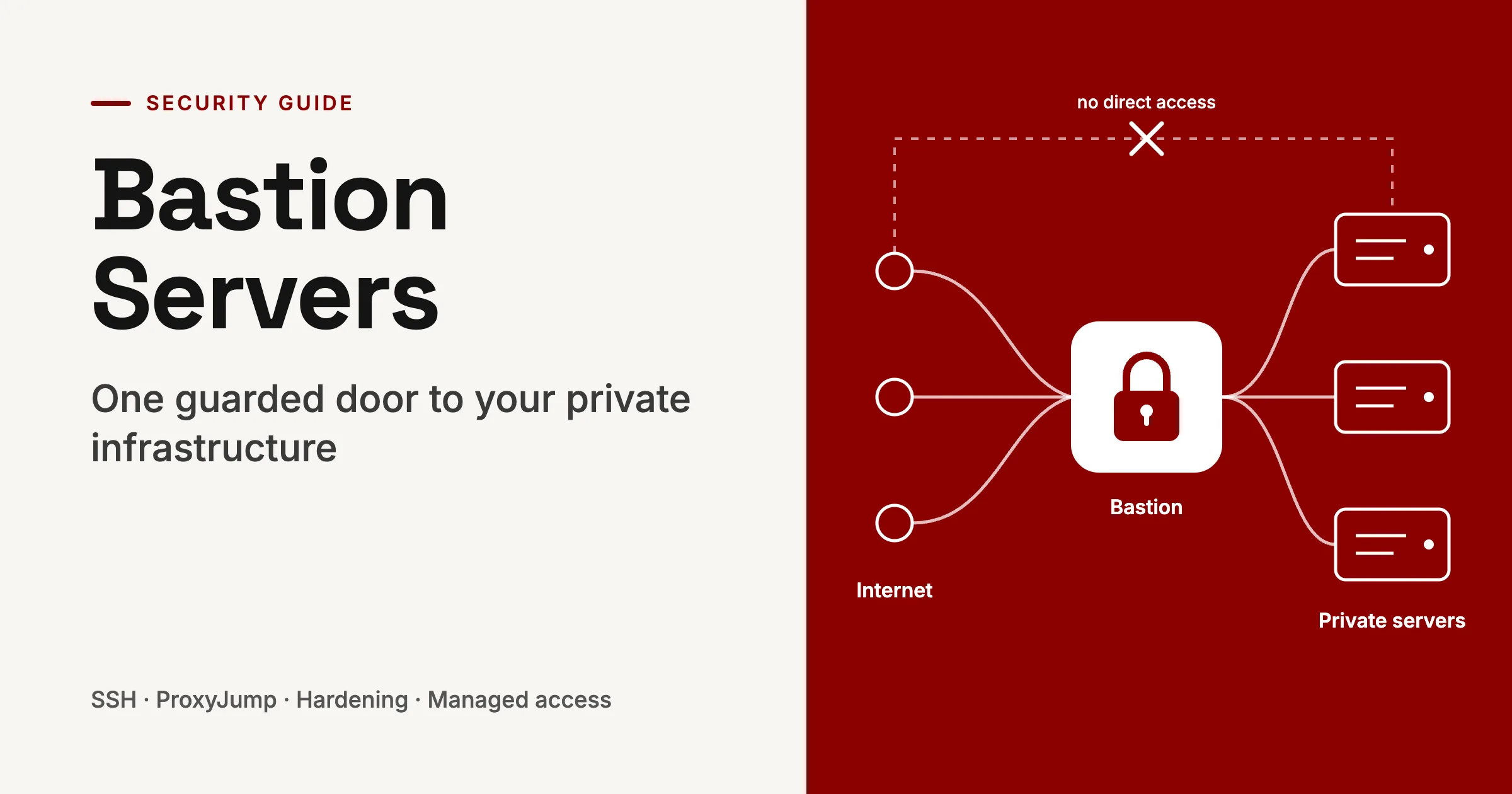
A bastion server provides one controlled route into private infrastructure, allowing internal servers to remain hidden from the public internet.
Automated scanners constantly search for exposed SSH and RDP services. Every server with a public management port becomes another system that must be patched, monitored, access-controlled, and audited. A bastion consolidates those separate entry points into one deliberately hardened gateway.
This guide explains what a bastion server is, how it operates, how to secure it properly, and when a managed access service may be a better fit.
What is a bastion server?
A bastion server, also known as a bastion host or jump box, is a minimal, tightly secured server that acts as the approved entry point into a private network.
The term comes from castle architecture. A bastion was the reinforced section of a fortress wall designed to absorb an attack. In modern infrastructure, the bastion host is the system intentionally placed where attackers can reach it, while the systems behind it remain inaccessible from the internet.
It runs only the software necessary to broker administrative connections, commonly SSH for Linux systems or RDP for Windows. Because it is exposed, it must be configured, patched, and monitored more strictly than almost any other server in the environment.
A useful analogy is an office reception desk. Visitors cannot enter unrestricted areas directly; they identify themselves, are recorded, and are directed only to the areas they are authorized to access.
Bastion host vs. jump server
Although the terms are frequently used interchangeably, they describe slightly different roles.
| Aspect | Bastion host | Jump server |
|---|---|---|
| Network position | Reachable from an untrusted network, often the internet | Located within a trusted internal network |
| Main purpose | Controlled entry from outside into private systems | Movement between internal network zones |
| Security posture | Maximum hardening due to internet exposure | Hardened, but primarily protects against lateral movement |
| Common example | An SSH gateway in a cloud public subnet | A Windows server reached through a corporate VPN |
Some organizations use both. A user may first authenticate to an internet-facing bastion, then connect through an internal jump server before reaching highly sensitive systems. Each layer can enforce separate identity checks, permissions, and audit records.
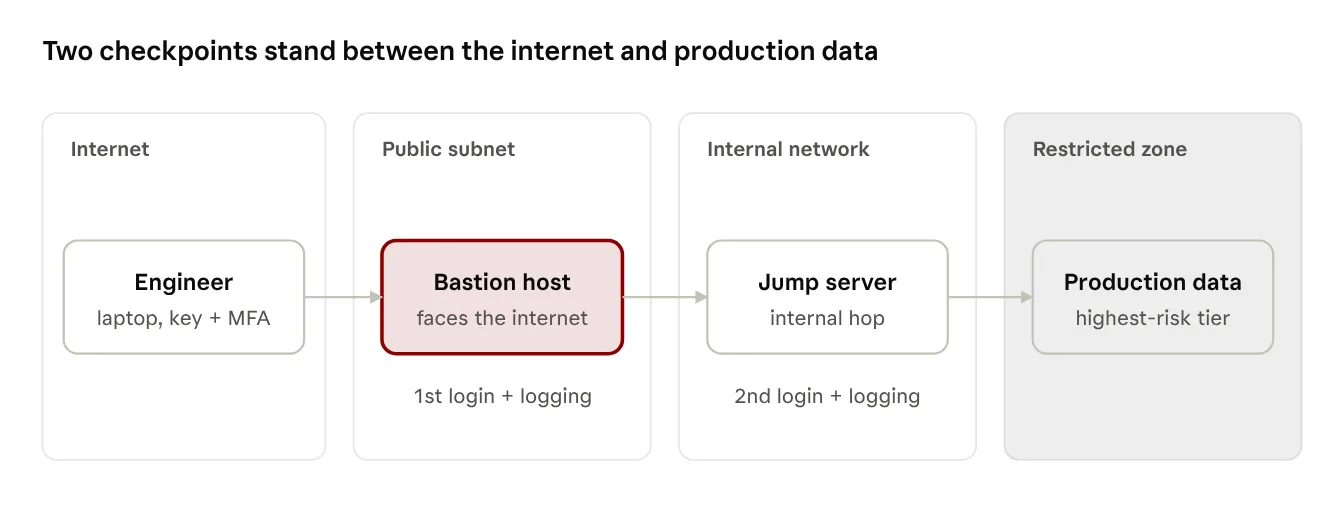
Each hop asks for a fresh login and keeps its own log, so one stolen credential isn't enough to reach production.
How a bastion server works
In a common cloud design, the bastion sits in a public subnet while application, database, and internal-service servers occupy private subnets without public IP addresses.
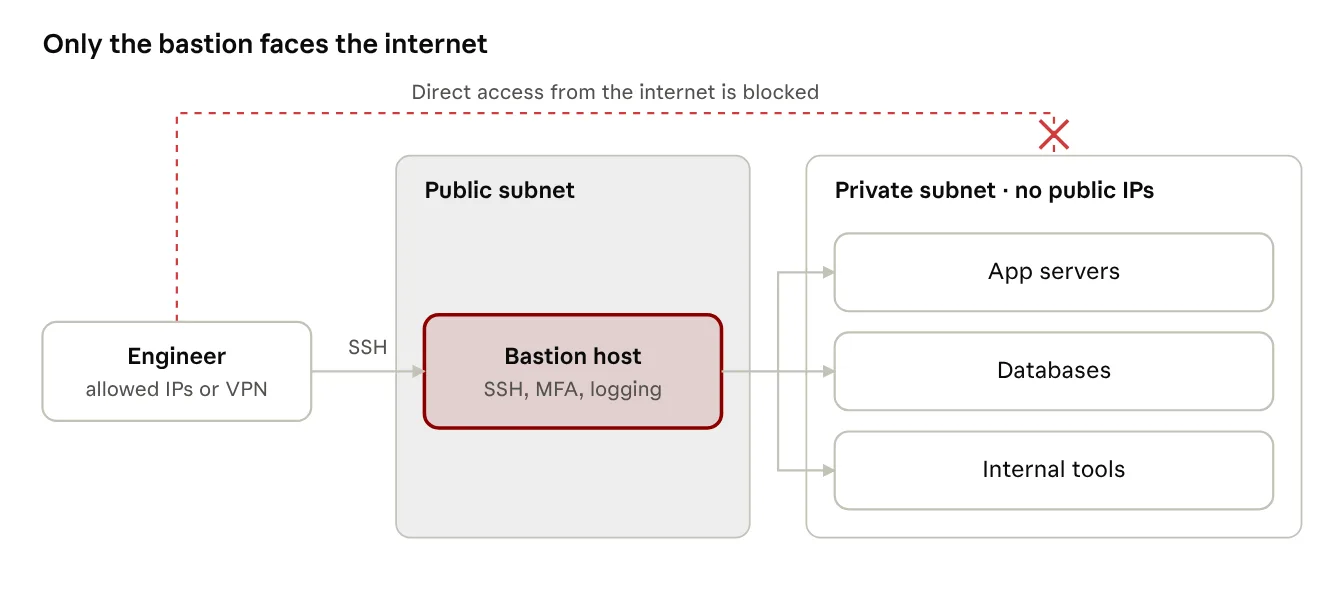
Engineers reach private servers only by hopping through the bastion; the private subnet never accepts connections from the internet.
The workflow is straightforward:
- An engineer connects to the bastion through SSH, typically from an approved IP range or VPN.
- The bastion validates the user's identity, ideally with an SSH key and multi-factor authentication.
- The connection is logged and access policy is applied.
- The engineer connects onward to the required private server.
- Private servers accept management traffic only from the bastion's security group or IP address.
Modern OpenSSH simplifies this with ProxyJump. The user's private key remains on their local machine; it does not need to be copied to the bastion.
ssh -J alice@bastion.example.com alice@10.0.2.15
You can also define the route in ~/.ssh/config:
Host bastion HostName bastion.example.com User alice IdentityFile ~/.ssh/id_ed25519 Host app-* ProxyJump bastion User alice Host app-1 HostName 10.0.2.15
With this configuration, running ssh app-1 automatically routes the connection through the bastion. It's also the method Oracle's OpenSSH guide recommends for hopping through bastion and jump hosts.
ProxyJump vs. SSH agent forwarding
Older guides often suggest SSH agent forwarding using ssh -A or ForwardAgent yes. The goal, avoiding copied private keys, is sound, but the mechanism carries risk.
With agent forwarding, the bastion receives a socket connected to the SSH agent running on the user's local device. A privileged attacker on the bastion could potentially use that socket to authenticate to other systems as the user. Oracle's OpenSSH guide flags exactly this risk and points readers to ProxyJump as the safer option (Oracle Linux docs).
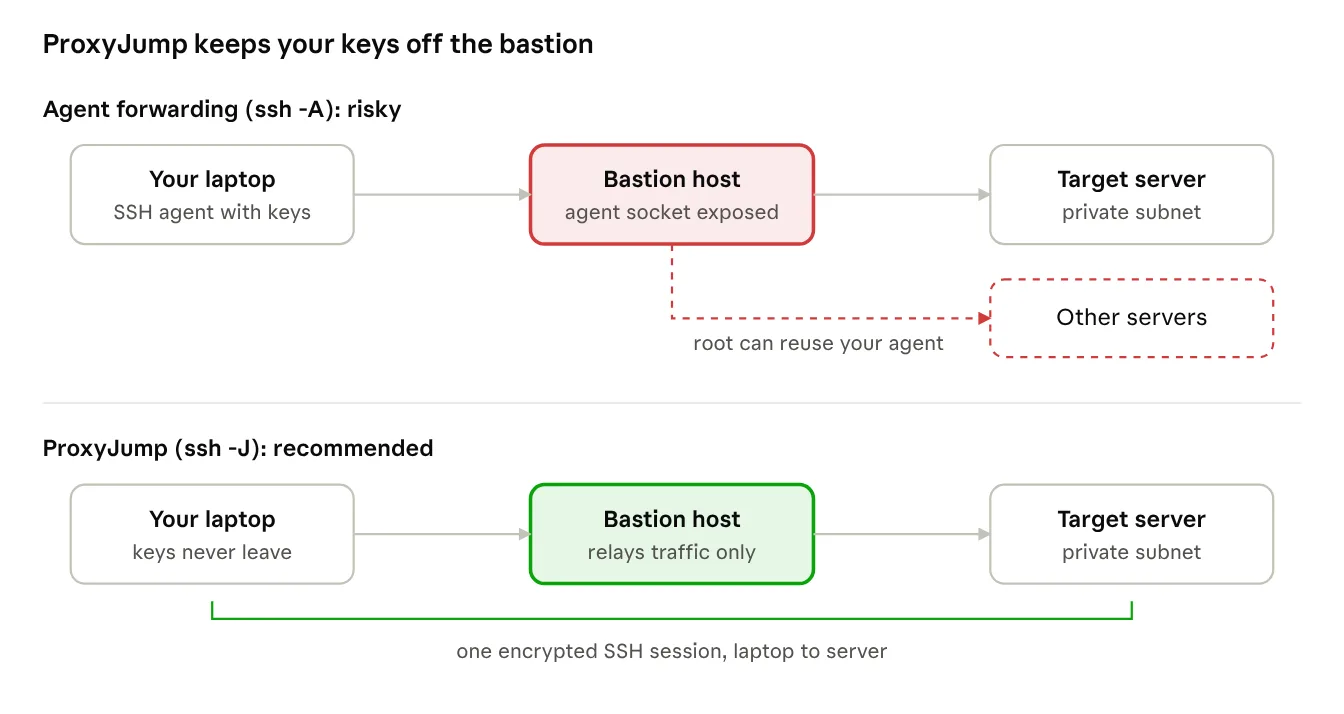
With agent forwarding, a compromised bastion can borrow your keys. With ProxyJump, it only passes encrypted traffic along.
| Aspect | Agent forwarding (-A) | ProxyJump (-J) |
|---|---|---|
| Private-key location | The local SSH agent is exposed through a socket | Keys remain on the user's device |
| Risk after bastion compromise | A privileged attacker may reuse the agent socket | The agent socket is not exposed |
| Recommended use | Only when no alternative exists | Default approach |
If agent forwarding is unavoidable, for example to access a Git repository from the bastion, limit it to that specific host and use ssh-add -c, which asks for confirmation before each key use.
Why use a bastion?
The primary advantage is reducing the number of systems exposed to the internet.
- Smaller attack surface: Only the bastion needs a public management port; databases, application servers, and internal tools can remain private.
- Centralized controls: MFA, IP restrictions, key policies, and access rules are managed in one location.
- Improved visibility: Because privileged sessions pass through a common gateway, it becomes easier to determine who accessed production and when.
- Simpler offboarding: Removing a user's access at the bastion can immediately prevent access to the systems behind it.
- Compliance support: Auditors commonly look for evidence that privileged access is limited to named individuals and recorded. A bastion makes that evidence easier to collect, although exact obligations depend on the standard and scope.
- Better containment: If private servers have no other public ingress route, a compromised internal server is not directly reachable from the internet.
Hardening best practices
A bastion is useful only if it is one of the most difficult systems in your environment to compromise. Treat it as a high-value security control, not an ordinary utility server.
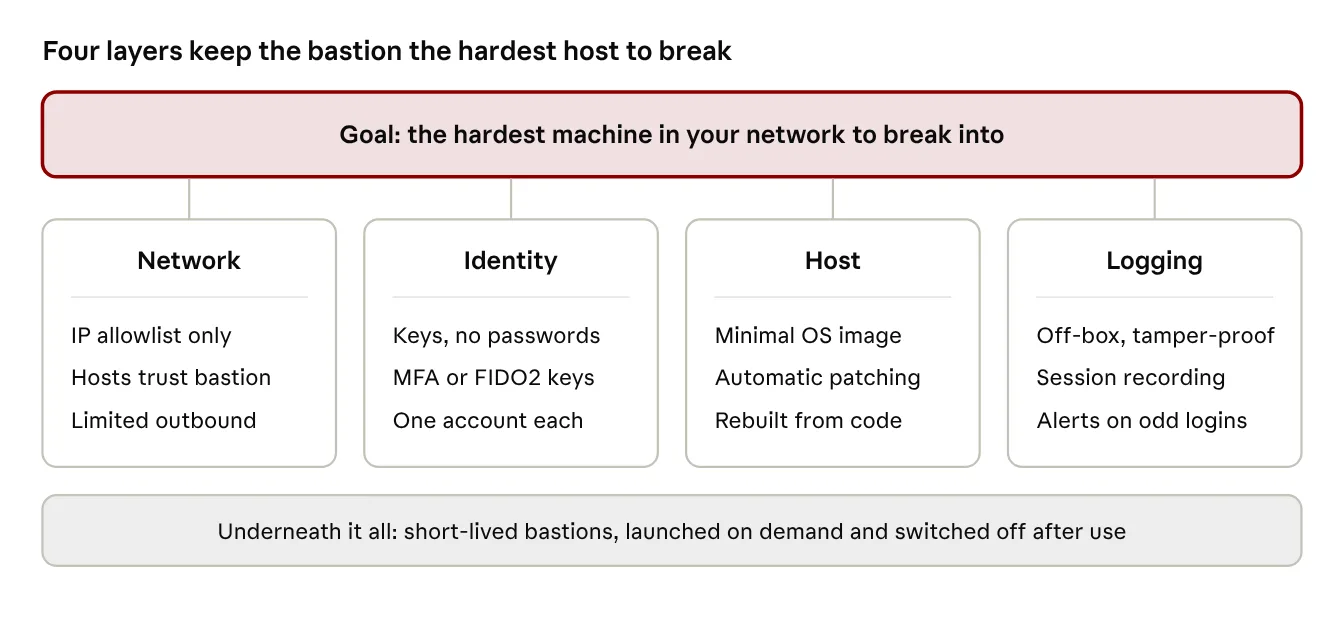
No single control is enough on its own; the layers work together, and the details follow below.
Network restrictions
- Permit inbound SSH only from known IP ranges, a VPN, or an identity-aware access service. Avoid 0.0.0.0/0.
- Configure private servers to accept SSH only from the bastion's security group or IP address.
- Limit bastion outbound access to the private subnets it actually needs.
- Use separate security groups for the bastion and protected workloads.
Authentication
- Disable password authentication and direct root login.
- Use individual accounts and SSH keys, preferably Ed25519.
- Add MFA through a PAM module, Duo, or an identity provider.
- Consider FIDO2 security keys or ed25519-sk keys for stronger protection.
- Favor short-lived SSH certificates issued by an SSH certificate authority over long-lived static keys.
- Revoke access promptly when someone changes role or leaves the organization.
A conservative SSH configuration baseline (/etc/ssh/sshd_config):
PermitRootLogin no PasswordAuthentication no KbdInteractiveAuthentication no PubkeyAuthentication yes AllowAgentForwarding no X11Forwarding no MaxAuthTries 3 LoginGraceTime 30 ClientAliveInterval 300 ClientAliveCountMax 2 AllowGroups bastion-users
Host configuration
- Begin with a minimal operating-system image and remove unnecessary packages.
- Enable automated security updates where appropriate, such as unattended-upgrades.
- Use fail2ban or an equivalent tool to limit repeated failed login attempts.
- Keep production secrets, application code, and customer data off the bastion.
- Build the host from infrastructure-as-code and treat it as disposable rather than manually maintained.
Logging and monitoring
- Send authentication and system logs to a central platform the bastion cannot alter.
- Use auditd, tlog, or comparable tooling to record privileged activity where needed.
- Alert on unexpected source addresses, repeated failures, unusual login times, and newly created accounts.
- Retain logs according to your security, operational, and regulatory requirements.
Short-lived bastions
Avoid leaving a bastion running continuously if your workflow allows it. Launch it only when access is needed, automatically shut it down after a defined period, and rebuild it from a clean image each time it starts.
This approach limits the window in which an attacker can exploit a persistent host and ensures that changes made during a previous session do not persist.
Setting up a bastion server
The same principles apply across cloud providers and on-premises environments; only the underlying products differ.
- Segment the network. Create a public subnet or DMZ for the bastion and private subnets for protected workloads.
- Set firewall rules. Allow inbound TCP 22 to the bastion only from approved sources; allow inbound TCP 22 to private servers only from the bastion.
- Deploy the bastion. Use a minimal Linux image in the public subnet.
- Use stable addressing. Assign a static public IP and DNS name so firewall rules and SSH configurations remain stable across rebuilds.
- Keep workloads private. Ensure application and database servers have no public IP addresses.
- Harden and monitor. Apply the controls above and forward logs to a central system.
- Connect using ProxyJump. Use ssh -J or the SSH configuration shown earlier.
For resilience, define the bastion in Terraform, Packer, or another infrastructure-as-code tool. A replacement should be reproducible in minutes. Organizations with strict availability requirements may also operate a standby instance in another availability zone or site.
Managed alternatives
Many teams now avoid operating their own bastion by using a managed access service. These options can remove the need for an open SSH port while preserving identity-based access control and auditing.
| Option | How it works | Public inbound port? | Best fit |
|---|---|---|---|
| Self-managed bastion | A hardened VM that you operate and patch | Yes | Hybrid, on-premises, or multi-cloud environments |
| AWS Systems Manager Session Manager | An agent establishes an outbound channel; IAM governs access | No | AWS-native fleets |
| AWS EC2 Instance Connect Endpoint | Identity-aware TCP proxy for private instances | No | AWS teams that still want SSH |
| Azure Bastion | Managed browser-based RDP and SSH access | No public IP required on target VMs | Azure workloads |
| Google Cloud IAP TCP forwarding | Identity-aware proxy tunnels TCP traffic after authorization | No | GCP workloads |
| Zero-trust access platforms | Per-user, per-resource access with policy and often session recording | Usually no | Mixed environments and larger teams |
Platform notes:
- AWS. EC2 Instance Connect Endpoint lets engineers reach private instances from outside AWS with no bastion to run, even in a VPC that has no route to the internet. It checks each user's IAM identity and permissions before any traffic enters the network, and it records every connection attempt, failed ones included, in CloudTrail (AWS docs).
- Azure. As of November 2026, Azure Bastion is offered in four SKUs: Developer, Basic, Standard and Premium, with Developer available only in some regions (SKU comparison). Target VMs don't need public IP addresses (Microsoft Learn). Premium adds graphical session recording and a private-only deployment mode. Billing is hourly from deployment, so check Azure's current pricing page before planning costs.
- Google Cloud. IAP TCP forwarding verifies the user's identity before opening a tunnel to SSH, RDP, or another TCP service (Google Cloud docs). The firewall can allow IAP's address range, 35.235.240.0/20, and users need the appropriate IAP tunnel role. Pairing it with OS Login ties SSH access to Google identities.
A self-managed bastion remains a practical choice for hybrid or on-premises environments, or when you need specialized tooling that managed services do not support. For workloads entirely within one cloud provider, a managed service is often less maintenance-intensive and can be safer.
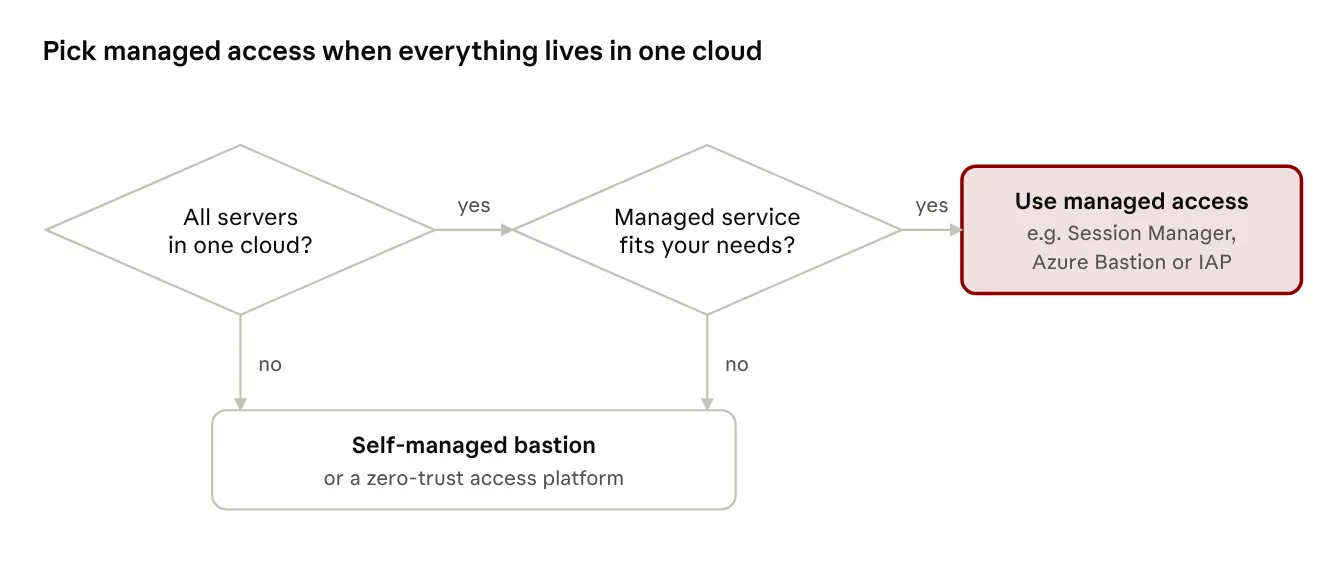
If your servers sit in one cloud and its managed service covers your needs, skip running your own bastion.
Common mistakes
Most bastion-related security failures stem from avoidable shortcuts rather than sophisticated attacks.
- Opening port 22 to the entire internet "temporarily" and failing to close it.
- Storing private keys on the bastion; use ProxyJump instead.
- Using shared accounts, which weakens accountability and makes audit logs less useful.
- Leaving alternate paths into private servers, allowing the bastion to be bypassed.
- Installing unnecessary tools such as database clients, CI agents, or web servers.
- Treating the bastion as "just a jump box" and postponing patching.
- Keeping logs only on the bastion, where an attacker with sufficient privileges could alter or delete them.
Conclusion
A bastion server trades a scattered set of exposed servers for a single checkpoint you can watch closely. Keep it minimal, restrict its network access, enforce strong identity controls, send logs to a system it cannot modify, and rebuild it regularly.
If your infrastructure lives entirely in one cloud, evaluate managed alternatives first. They can deliver the same core benefit, controlled and auditable access to private systems, without requiring you to patch and operate a persistent internet-facing server.
FAQ
Is a bastion host the same as a jump server? In everyday usage, largely yes. Strictly, a bastion faces an untrusted network such as the internet, while a jump server sits between trusted internal zones.
Is a bastion server the same as a VPN? No. A VPN often provides broad network connectivity, while a bastion provides a controlled, logged hop to specific systems. Many teams use both: a VPN to reach the bastion, then the bastion to reach individual servers.
Isn't a firewall enough? No. A firewall determines which traffic may pass. A bastion also authenticates users, applies access policy, and can record privileged activity. A strong design uses both.
Does a bastion work for Windows servers? Yes. A Windows bastion, often called a jump server or RD Gateway, can broker RDP sessions in a similar way.
How large should the bastion instance be? Modest. Base its size on the number of simultaneous users and the monitoring or recording tools running on it, not on the size of your application servers.
Do I still need a bastion with SSM Session Manager or Azure Bastion? Usually, no. These services can provide controlled, logged access without requiring you to operate and patch a separate bastion VM.